

Key takeaways
- Compare the best cable management kits for home office desks, from all-in-one organizer sets to under-desk trays, sleeves, raceways, and clips.
A home office desk collects cables fast. A monitor cable, a laptop charger, a keyboard lead, a lamp cord, and a phone cable can turn a clean desk into a tangle within a week. Loose cables do more than look messy. They snag on chair wheels, pull plugs out of sockets, collect dust, and make it hard to move a monitor or swap a device without crawling under the desk.
A cable management kit gives every cord a route and a resting place. The best kits combine several parts in one box, so a single purchase covers bundling, routing, and hiding. This guide compares five kits that fit a home office desk, from a 192-piece all-in-one set to steel under-desk trays and adhesive raceways, so you can match the kit to the size of your cable problem.
As an Amazon Associate, we earn from qualifying purchases.
Table of Contents
- Quick Answer
- N NOROCME 192 PCS Cable Management Kit
- JOTO 4 Pack Cable Management Sleeve
- EVEO Cable Management 96 Inch J Channel 6 Pack
- AEONS Under Desk Cable Management Tray Kit
- Monoprice Under Desk Cable Tray
- How to Choose
- Who Should Skip It
- Frequently Asked Questions
- Conclusion
- Product and ASIN Reference
Quick Answer
For most home office desks, the N NOROCME 192-piece kit covers the whole job in one box, with sleeves, clips, holders, straps, and ties. If cables mostly dangle under the desk, pair a tray such as the AEONS adjustable kit with the N NOROCME clips. For a single neat bundle running to a monitor or television, the JOTO sleeve four-pack is the simplest fix.
N NOROCME 192 PCS Cable Management Kit
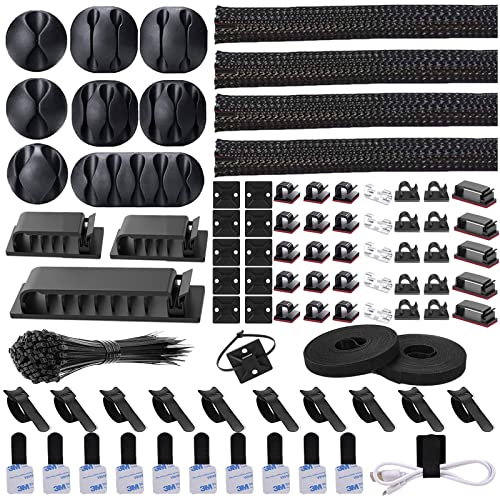
The N NOROCME 192-piece kit is the most complete single purchase in this guide. It bundles four wire organizer sleeves, eleven cable holders, thirty-five cord clips, ten plus two rolls of cable organizer straps, and one hundred fastening cable ties. That mix covers the three jobs a desk kit has to do: gather loose cables into sleeves, route them along a desk edge or leg with clips and holders, and lock the bundles down with straps and ties.
The split sleeves are the workhorse here. Each sleeve wraps around a bundle of cables and closes along its length, so you can add or remove a cable without undoing the whole run. The adhesive clips and holders stick to a desk edge, a desk leg, or a wall, and they give each cable a fixed path instead of letting it hang. The roll straps are reusable, which matters when you swap a charger or move a monitor, because you can open them, adjust the bundle, and close them again. The one hundred fastening ties handle the final tidy-up for cables that stay put for months.
This kit suits a desk with many devices. A typical home office with a monitor, a laptop dock, a keyboard, a headset, a lamp, and a phone charger can use every part type in the box in a single afternoon. The black and clear color options blend with most desks, and the polycarbonate and polyamide66 materials are the same tough plastics used across this product class.
There are limits to watch. The kit is surface-based, so it does not hide a power strip or a bulky adapter the way an under-desk tray does. Adhesive clips hold best on smooth, clean surfaces, and they can lose grip on rough wood, textured laminate, or a dusty desk edge. The sleeves are split designs, so very thick bundles may need two sleeves side by side rather than one overstuffed sleeve. Count your cables before you buy, and keep a few spare clips for the day you add a new device.
A sensible setup order makes the kit go further. Bundle the cables into sleeves first, then fix the clips and holders along the route, and save the ties for the final pass once every cable is in place. Leave a little slack at each device end, so a cable pulled tight does not tug its plug loose.
Specs
- Pieces: 192
- Wire organizer sleeves: 4
- Cable holders: 11
- Cord clips: 35
- Cable organizer straps: 10 plus 2 rolls
- Fastening cable ties: 100
- Material: Polycarbonate and Polyamide66
- Color: Black, clear
- Style: Modern
- Dimensions: Not stated
- Weight: Not stated
JOTO 4 Pack Cable Management Sleeve

The JOTO four-pack is the simplest product in this guide, and that simplicity is its strength. Each sleeve is a nineteen to twenty inch neoprene tube with a zipper along its length. You lay the cables inside, zip the sleeve closed, and the bundle becomes a single tidy cord that runs from the desk to the wall or to the device. Four sleeves in the box cover four separate runs, which is enough for most single-monitor desks.
Neoprene is a forgiving material for this job. It flexes around a bundle, grips the cables lightly so they do not slide, and keeps its shape after being opened and closed many times. The zipper is the key detail: unlike a solid tube that forces you to thread cables through from one end, the zipper lets you drop cables in from the side and add a new cable later without starting over. The black color disappears against a dark desk or a dark wall, and the sleeves can be cut to length for shorter runs.
This sleeve set fits a specific job better than any other pick here. If your cables already run in one or two neat lines and you only need to hide them, the JOTO sleeves do that with no tools and no adhesive. They also work well behind a television or a media stand, where the same problem appears in a different room.
What the sleeves do not do is route or anchor cables. There are no clips, no holders, and no tray in the box, so a heavy power brick will still pull a bundle down unless you support it another way. The nineteen to twenty inch length suits a run from a desk to a nearby outlet, but a long run across a room needs two sleeves joined end to end, and the join will show. Measure your longest run before ordering, and keep one sleeve spare for the cable you add next month.
Trimming a sleeve to fit is simple, but cut it with the zipper closed and the cables out, then check the cut end for loose threads before you load it. If the run bends around a desk leg, leave the sleeve a little long so the bend stays gentle.
Specs
- Pieces: 4 sleeves
- Length: 19 to 20 inches per sleeve
- Material: Neoprene
- Closure: Zipper
- Color: Black
- Item model number: JOTO-CS-ZIP-20
- Dimensions: Not stated
- Weight: Not stated
EVEO Cable Management 96 Inch J Channel 6 Pack

The EVEO J Channel kit takes a different approach from the sleeves and the all-in-one set. It is a raceway system: six rigid sixteen inch channels that stick under a desk with a built-in adhesive stripe, forming a continuous ninety-six inch run. Cables drop into the open-top J shape from above, so you can lay a power strip cord, a monitor cable, and an ethernet lead into the channel in seconds, and lift any one of them out again just as fast.
The open-top design is the reason to choose this kit. Closed raceways force you to thread cables through from the end, which is slow and awkward once a desk is already set up. The J channel lets you work from above with the desk in place. The maker rates the system for up to ten power cords or sixteen Cat-5 ethernet cables, which is generous capacity for a home office desk. The self-adhesive stripe means no drilling and no screws, and the white finish suits a light desk or a white wall.
Two points need care. First, the adhesive stripe holds best on a smooth, flat desk underside that has been wiped clean, and it may not grip a rough or oiled wood surface. Second, the listing record for this product showed conflicting availability signals at research time, with one crawl recording no featured offers while the listing also showed strong recent buying activity. Confirm that the listing is in stock before ordering, and confirm the white color if your desk is dark, since the same channel is also sold in black under a different code.
The channel is a single-purpose tool. It hides cables under a desk very well, but it does not bundle cables on top of the desk, and it does not include clips or ties for the run from the desk to the wall. Pair it with a small clip set for the full route.
Measure the underside of your desk before ordering, because six sixteen inch channels cover ninety-six inches only if the runs are straight. A desk with a cross brace or a cable grommet may need the channels cut into shorter pieces, and each cut needs a clean edge so cables do not catch. Plan the route so the channel ends near the outlet, and leave the last few inches of cable free so the plug can reach without strain.
Specs
- Pieces: 6 channels
- Channel length: 16 inches each
- Total length: 96 inches
- Product dimensions: 16.18 inches long by 3.78 inches wide
- Installation: Self-adhesive stripe
- Capacity: Up to 10 power cords or 16 Cat-5 ethernet cables
- Material: Neoprene
- Color: White
- Item model number: JC-W
- Manufacturer: EVEO
- Weight: Not stated
AEONS Under Desk Cable Management Tray Kit

The AEONS tray kit is the pick for a desk with a heavy power strip and several bulky adapters. It is a metal tray that clamps under the desk and holds the power strip, the adapters, and the slack cable off the floor and out of sight. The tray adjusts from twenty-three inches to forty-one inches in length, so it fits a compact desk and a wide standing desk alike, and the reversible design lets you mount it with the opening facing the way that suits your cable runs.
The C-clamp mount is the detail that sets this tray apart from screw-mounted trays. No drilling is needed, and the tray can move with you to a new desk. The clamp grips the desk edge, the tray hangs below, and the power strip sits inside the tray where its plugs face up and its cables drop in from above. That layout keeps adapters from dangling, stops the power strip from sliding around on the floor, and leaves the floor clear for a chair and for cleaning.
An adjustable tray still needs a desk it can clamp to. Very thick desktops, very thin desktops, and desks with a deep apron or a modesty panel may not suit the clamp, so check the thickness and the clearance under your desk before ordering. The tray holds the heavy parts, but it does not bundle the cables that run from the tray to each device, so a sleeve or a few clips complete the job. The black finish is neutral, and the metal build handles the weight of several adapters without sagging.
Load the tray heaviest items first, with the power strip flat and the largest adapters beside it, then lay the cables over the top so they can be lifted out without moving the strip. Keep the tray opening facing the side where most cables arrive, and leave a finger of space at each end for the next adapter. If the desk is a standing desk, check the tray clearance at the lowest height, since the tray hangs below the desktop and can meet a drawer or a modesty panel when the desk drops.
Specs
- Length: Adjustable 23 to 41 inches
- Mount: Removable C clamp, no drill
- Design: Reversible
- Color: Black
- Item model number: BX21-DCM-D303B-V
- Material: Not stated
- Weight: Not stated
- Load capacity: Not stated
Monoprice Under Desk Cable Tray

The Monoprice tray from the Workstream collection is the most substantial pick in this guide. It is a steel under-desk tray that combines a cable channel with a power supply mount, so the power strip and the cable runs share one fixed home under the desk. The steel build is rigid, the white finish matches a light desk, and the fixed mount suits a desk that will not move.
A steel tray earns its place when the cable load is heavy. Multiple adapters, a dock, a monitor power brick, and a surge protector add real weight, and a steel tray holds that weight without flexing. The tray keeps everything off the floor, which protects plugs from chair wheels and from the occasional spill, and it keeps the underside of the desk tidy enough to reach in and swap a cable without a flashlight.
The trade-off is permanence. A fixed tray needs screws and a desk underside that accepts them, and it is harder to move than a clamp-on tray. The white finish is a good match for a white or light desk but stands out under a dark one. Dimensions and load limits were not stated in the confirmed listing excerpt, so measure the space under your desk and confirm the fit before ordering. For a permanent home office with a heavy cable load, this is the most durable option in the guide.
Plan the install before you drill. Mark the screw positions with the tray held in place, check that no drawer runner or frame member sits in the way, and confirm the power strip fits inside with its plugs facing up. A dry run with the strip and adapters laid in the tray on the floor shows whether the cables reach each device, and it avoids drilling twice.
Specs
- Material: Steel
- Color: White
- Collection: Workstream
- Includes: Power supply and wire management
- Mount: Under desk, fixed
- Dimensions: Not stated
- Weight: Not stated
- Load capacity: Not stated
How to Choose
Start by counting cables and finding the heavy parts. A desk with a handful of thin cables needs a sleeve set or an all-in-one kit. A desk with a power strip, a dock, and several adapters needs a tray first, then sleeves or clips for the runs to each device. Count the thickest cable in the bundle, because the thickest cable decides the sleeve size and the channel width.
Next, look at the desk itself. A smooth desk underside suits adhesive raceways and adhesive clips. A desk with a thick edge suits a clamp-on tray. A desk you own and will keep for years suits a fixed steel tray. A rented desk or a desk you may replace suits a clamp-on tray or an adhesive system that leaves no holes.
Then think about change. If you swap devices often, choose an open-top channel or a zippered sleeve, both of which let you add or remove a cable in seconds. If the setup is fixed for a year, a closed sleeve or a fastening tie is fine. Finally, match the color to the desk. Black disappears under a dark desk, white disappears under a light one, and a mismatched color draws the eye to the very thing you are trying to hide.
Who Should Skip It
Skip a full kit if your desk has only one or two cables. A single laptop charger and a monitor cable need one sleeve or a few clips, not a 192-piece set. Skip an under-desk tray if your desk has no clearance underneath, or if the desktop is glass, since a clamp can stress glass and screws have nowhere to bite.
Skip adhesive raceways and clips if your desk surface is rough, oiled, or dusty, because the adhesive will not hold and the channel will sag. Skip a fixed steel tray if you move desks often or rent your furniture. And skip any kit that only covers one part of the job if your cables run both under the desk and across the floor, since you will end up buying a second product anyway.
Frequently Asked Questions
How many pieces does a home office cable kit need?
A small desk with one monitor and a laptop needs a sleeve set or a handful of clips. A full setup with a monitor, a dock, a keyboard, a headset, a lamp, and a charger benefits from a kit with at least one hundred pieces, because the clips, holders, straps, and ties each handle a different part of the route.
Do adhesive cable channels damage a desk?
A good adhesive stripe holds firmly on a smooth surface and usually peels away with gentle heat and slow pulling. It can leave residue on some finishes, and it may pull up a thin veneer if removed roughly. Clean the surface first, press firmly, and wait a day before loading the channel.
Can a cable tray hold a power strip and adapters?
Yes, that is the main job of an under-desk tray. The tray holds the power strip with its plugs facing up, and the adapters sit inside the tray with their cables dropping in from above. Check the tray length against the power strip length, and check the clamp or screw mount against your desk before ordering.
Should cables run under the desk or along the wall?
Under the desk is best for the short runs from a power strip to each device, because the cables stay hidden and out of foot traffic. Along the wall is best for the long run from the desk to the outlet. Most tidy desks use both: a tray or channel under the desk, and a sleeve or raceway for the wall run.
Conclusion
The right cable management kit depends on the size of the mess and the shape of the desk. The N NOROCME 192-piece kit is the best single purchase for most home office desks, because it covers bundling, routing, and fastening in one box. The JOTO sleeve four-pack is the simplest fix for a single neat bundle. The EVEO J Channel raceway hides under-desk runs with an open top that makes changes easy. The AEONS adjustable tray handles heavy power strips without drilling, and the Monoprice steel tray is the most durable home for a permanent, heavy setup. Count your cables, check your desk, and pick the kit that covers the whole route, not just the part you can see.
Product and ASIN Reference
| Product | ASIN | Value group |
|---|---|---|
| N NOROCME 192 PCS Cable Management Kit | B0B687J37D | budget |
| JOTO 4 Pack Cable Management Sleeve | B015HWXG4M | budget |
| EVEO Cable Management 96 Inch J Channel 6 Pack | B08QGRGVKX | mid-range |
| AEONS Under Desk Cable Management Tray Kit | B0B1VBZMBQ | mid-range |
| Monoprice Under Desk Cable Tray | B07H48SY8G | premium |
More from Amazon
Programs that pair well with the guide above. Offers and eligibility are set by Amazon and may change.
Free shipping on eligible items, Prime Video and more. Eligible new members can start with a free trial.
Start a Prime free trialAd-free music streaming. Eligible new subscribers can start with a free trial.
Try Music Unlimited freeA Prime membership for ages 18-24 with a trial period. Eligibility is set by Amazon.
See Prime for Young AdultsAudiobooks and podcasts to listen to on the go. Eligible new members can start with a free trial.
Try Audible freeAs an Amazon Associate we earn from qualifying purchases.










Write Your Review
No reviews yet. Be the first to share your experience!