

Key takeaways
- Find the best laptop cooling pad for your desk with five fan-powered picks for cooler laptops, quieter work, and steadier everyday performance.
A laptop that runs hot slows down, spins its internal fans louder, and turns a long work session into an uncomfortable one. A cooling pad lifts the machine off the desk and pushes fresh air across its underside. The result is a cooler keyboard deck, steadier performance during heavy tasks, and a more comfortable typing angle.
This guide covers five fan-powered cooling pads for different desks and different laptops: a slim three-fan pad for everyday carry, a five-fan pad with adjustable height for long office days, a gaming pad with a small control screen, a wide four-fan pad for large machines, and a soft lap mat for couch work. Each pick is described from its published specifications, with the fan layout, laptop size range, and build spelled out so you can match the pad to your machine.
As an Amazon Associate, we earn from qualifying purchases.
Table of Contents
- Quick Answer
- HAVIT HV-F2056
- Kootek LCP04
- TopMate C5
- KLIM Wind
- Targus Lap Chill Mat AWE55US
- How to Choose
- Who Should Skip It
- Frequently Asked Questions
- Conclusion
- Product and ASIN Reference
Quick Answer
For most desks, the HAVIT HV-F2056 is the starting point: three fans, a metal mesh deck, and a size range that covers laptops. If you want more airflow and a taller tilt, the Kootek LCP04 adds two more fans and six height settings. Gamers who like on-pad controls should look at the TopMate C5, while owners of large machines get the widest fit from the KLIM Wind.
HAVIT HV-F2056

The HAVIT HV-F2056 is the classic slim cooling pad, and it earns its place here by doing the simple things well. Three fans sit under a metal mesh surface, and the whole unit measures 14.96 by 1.18 by 11.02 inches with a weight of 1.54 pounds. That slim profile matters if the pad travels with the laptop in a bag, or if desk space is tight and a bulky stand would crowd the keyboard and mouse.
The pad fits laptops from 15.6 to 17 inches, which covers the most common full-size work and gaming machines. Its three fans are each 110 millimeters across, so airflow spreads across the middle of the laptop base rather than concentrating in one spot. Two USB ports sit on the side: one powers the pad from the laptop while the second stays free for a mouse receiver or a flash drive. A small switch controls the blue LED lighting and the fans, so the lights can stay off in a shared office without stopping the cooling.
Build quality is straightforward: a metal mesh top for airflow, an ABS frame underneath, and a front anti-slip strip that keeps the laptop from sliding toward the user. The height adjusts through fold-out feet at the back, giving a gentle typing angle that takes pressure off the wrists during long sessions. At 1.54 pounds it travels easily.
This pad suits a buyer who wants a proven, no-fuss cooler for a standard-size laptop and does not need a display screen or extra features. It is the budget pick in this guide, and its long sales history means compatible accessories are easy to find. The three-fan layout is enough for office work, streaming, and light gaming, though it will not match the raw airflow of the five-fan pads below for sustained heavy loads.
One practical note: the 1.18 inch height is the closed thickness, and the rear feet raise the back edge higher still. Buyers with a 17 inch laptop should check that the machine’s depth fits inside the 11.02 inch pad depth, since very deep gaming laptops can overhang the front edge.
Specs
- Fans: 3 fans, each 110 mm
- Laptop size: 15.6 to 17 inches
- Dimensions: 14.96 x 1.18 x 11.02 inches
- Weight: 1.54 pounds
- Material: metal mesh top, ABS frame
- USB ports: 2
- Lighting: blue LED, switchable
- Model: HV-F2056
Kootek LCP04
The Kootek LCP04 steps up the airflow with five fans and steps up the ergonomics with six height settings. The fan layout pairs one large central fan, 4.72 inches across and spinning at 1400 RPM, with four smaller fans, each 2.76 inches across and spinning at 2400 RPM. That combination pushes air across the whole underside of the laptop, including the corners where heat tends to collect during long sessions.
Size coverage runs from 12 to 17 inches, so the same pad works for a compact 13 inch ultrabook and a full-size 17 inch machine. The pad measures 14.96 by 1.38 by 11.81 inches and weighs 2.55 pounds, which makes it a desk fixture rather than a travel companion. Six adjustable heights raise the screen to a comfortable viewing angle, and the front non-slip baffle holds the laptop in place on the steeper settings.
Three working modes cover one fan, four fans, or all five fans, and the LED lighting can be controlled independently. In a quiet room, running only the central fan keeps noise down during light work, while all five fans can spin up for gaming or video editing. Two USB 2.0 ports provide power plus one spare port.
The Kootek is the mid-range workhorse of this guide. It fits a buyer who spends long hours at one desk and wants stronger cooling and a genuinely adjustable typing angle. The extra weight compared with the HAVIT is the trade-off: this pad stays on the desk, and it rewards that with broader coverage and more control. The blue LED lighting is part of the design, so buyers who dislike glow should use the independent LED control to switch it off.
Watch for look-alike models when ordering. The LCP04 is the blue five-fan model with the model number LCP04. Kootek also sells an LCP05 in red and a newer LCP06 in purple, and those are separate listings with their own codes. Confirm the model number LCP04 at checkout.
Specs
- Fans: 5 fans (1 large 4.72 in at 1400 RPM, 4 small 2.76 in at 2400 RPM)
- Laptop size: 12 to 17 inches
- Dimensions: 14.96 x 1.38 x 11.81 inches
- Weight: 2.55 pounds
- Material: metal mesh
- Height settings: 6
- USB ports: 2 USB 2.0
- Working modes: 1 fan, 4 fans, or 5 fans
- Lighting: blue LED, independently controlled
- Model: LCP04
TopMate C5
The TopMate C5 is the control-freak pick of this guide, built for a buyer who wants to see and set the fan speed rather than guess. A small LCD screen and a button panel sit at the front of the pad, and they switch between six wind speeds and three fan operation modes. The screen shows the current setting at a glance, which is handy when the pad sits under a laptop and the controls are partly hidden.
Five fans do the cooling: one large central fan, 140 millimeters across, plus four smaller fans of 70 millimeters each. The pad fits 12 to 15.6 inch laptops and measures about 14.6 by 11.81 by 1.5 inches at about 2.1 pounds. Five height settings tilt the deck, and a hinged non-slip baffle keeps the laptop from sliding down the slope.
The build is plastic with a metal mesh top, which keeps the weight down while letting air pass through to the laptop base. Two USB ports handle power and leave one spare, and blue LED lighting gives the pad a gaming-desk look. Published airflow is 30 to 70 CFM across its speed range.
A note on the published fan speeds: the listing title quotes up to 2500 RPM, while the specification table lists the small fans at 2400 RPM and the large fan at 1200 RPM. This guide follows the specification table figures, since they break the speeds down fan by fan. Buyers should treat the headline speed figure as a rounded summary, not as the speed of every fan.
The TopMate C5 suits a gaming laptop owner or an office worker who changes tasks through the day and wants to dial the fans up for a render and down for email. The 15.6 inch ceiling is the hard limit: a 17 inch laptop will overhang the sides, so owners of larger machines should choose another pick here instead.
Specs
- Fans: 5 fans (1 large 140 mm, 4 small 70 mm)
- Laptop size: 12 to 15.6 inches
- Dimensions: about 14.6 x 11.81 x 1.5 inches
- Weight: about 2.1 pounds
- Material: plastic with metal mesh top
- Height settings: 5
- USB ports: 2
- Controls: LCD screen, 6 wind speeds, 3 fan modes
- Airflow: 30 to 70 CFM
- Lighting: blue LED
- Model: C5
KLIM Wind
The KLIM Wind is the wide-fit pick, built for laptops that are too large for most cooling pads. Four fans spin at 1200 RPM under a deck that accepts machines from 11 to 19 inches, which covers everything from a small notebook to a large desktop-replacement gaming laptop. That range makes it the safest choice when the household has more than one laptop of different sizes sharing a single pad.
The pad weighs 0.73 kilograms, about 1.61 pounds, and uses an ABS and metal build that stays rigid under a heavy machine. Adjustable rear legs set the tilt, front pegs hold the laptop in place, and two USB ports keep one port free for a peripheral. The pad carries a five-year warranty, the longest coverage in this guide. The model number is K2N and the manufacturer part number is k19.
Four fans at a modest 1200 RPM sounds less aggressive than the five-fan pads, but the larger deck and even fan spacing move air across the full base of a big laptop instead of blasting one hot spot. That even spread matters for large machines, where the battery, the processor, and the graphics hardware sit far apart.
Two details need care. First, the size range is quoted differently across listings: some say 11 to 16 inches and others say 10 to 19 inches. This guide follows the 11 to 19 inch range from the main listing, and buyers with a machine at either extreme should measure the laptop base against the pad before ordering. Second, the published dimension field reads 31 by 272 by 31 millimeters, which does not describe a laptop pad of this size and is treated here as a data error rather than a real measurement.
Specs
- Fans: 4 fans at 1200 RPM
- Laptop size: 11 to 19 inches
- Weight: 0.73 kilograms (about 1.61 pounds)
- Material: ABS and metal
- USB ports: 2
- Warranty: 5 years
- Model: K2N
- Manufacturer part number: k19
Targus Lap Chill Mat AWE55US
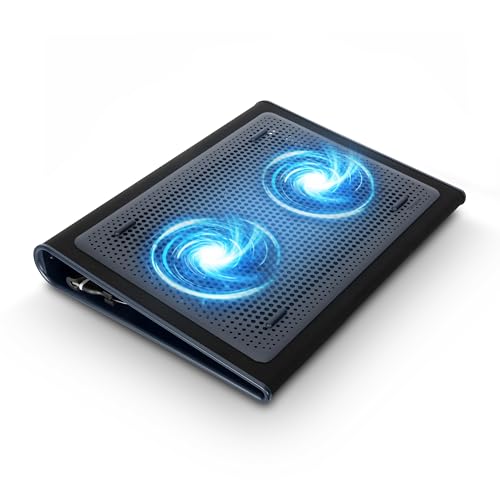
The Targus Lap Chill Mat AWE55US is the odd one out in this guide, and that is exactly why it belongs here. Instead of a rigid mesh deck, it is a soft neoprene mat with two built-in fans, made to sit on a lap or a bed rather than a desk. The neoprene layer shields legs and soft surfaces from laptop heat, while the fans push air across the laptop base. For anyone who works from a couch, an armchair, or a bed, that combination solves a problem no rigid pad can.
The mat fits laptops up to 17 inches and weighs 1.99 pounds. It connects through USB-A, drawing power from the laptop with no separate adapter and no wall outlet. The rubber and neoprene build flexes on uneven surfaces and stays comfortable against the legs for hours. Rubber grips hold the laptop in place while the mat flexes underneath it.
There are real trade-offs. The mat has no height adjustment, so it will not raise the screen the way the rigid pads do. Two fans move less air than the four- and five-fan pads, so it suits light and medium work better than sustained heavy gaming. On a flat desk, a rigid pad cools better and holds a steadier typing angle.
Model confusion is the main ordering risk. Targus sells several Chill Mat variants, and the codes are easy to mix up. The pick here is the AWE55US, the 17 inch dual-fan Lap Chill Mat. The AWE55GL is a separate global variant with its own code, and the older PA248U5 is the 16 inch Chill Mat, also a separate listing. Confirm the model AWE55US at checkout.
This is the premium pick in the guide, and its value is comfort and portability rather than maximum airflow. It suits a buyer who works away from a desk and wants heat protection plus active cooling in one soft, packable mat.
Specs
- Fans: 2 fans
- Laptop size: up to 17 inches
- Weight: 1.99 pounds
- Material: soft neoprene, rubber grips
- Connection: USB-A
- Cooling method: air
- Model: AWE55US
How to Choose
Start with laptop size, because it eliminates more options than any other factor. Measure the base of the laptop, not just the screen size, and compare it with the pad’s deck. A 15.6 inch laptop fits all five picks here, a 17 inch laptop fits four of them, and a 19 inch machine fits only the KLIM Wind.
Next, count the fans and think about how the laptop is used. Three fans handle office work, streaming, and web browsing with ease. Five fans suit gaming, video editing, and other sustained heavy loads, where heat builds up across the whole base. Two fans are enough for light work on a lap, which is the Targus mat’s job. Fan count alone does not decide cooling power, since fan size and speed matter too, but it is a useful first filter.
Then look at height adjustment. Six height settings on the Kootek and five on the TopMate let the screen rise to eye level, which helps posture during long days. The HAVIT and the KLIM Wind offer a simpler tilt through fold-out feet, which is enough for most desks. The Targus mat offers no tilt at all.
Noise is the next consideration. Larger fans spinning slower move the same air with less sound than small fans spinning fast, which is one reason the KLIM Wind’s four 1200 RPM fans stay quiet. Pads with multiple speed settings, like the TopMate C5 and the Kootek LCP04, let the user drop to a low speed during quiet work and raise it only when the laptop is under load.
Finally, check the extras that match the workspace. Two USB ports are standard across this guide, and the spare port keeps a mouse receiver or a flash drive connected. An LCD screen is useful for a gamer who changes fan speeds often and less useful for an office worker who sets the pad once and forgets it. LED lighting is a matter of taste, and every lit pad here can switch its lights off. Warranty length is worth a look too: five years on the KLIM Wind is the standout.
Who Should Skip It
A cooling pad is not the right fix for every hot laptop. If the machine overheats because its vents are clogged with dust, clean the vents first, since no pad can push air through a blocked intake. If the laptop is a thin ultrabook that stays cool during normal use, a pad adds bulk without a real benefit.
Lap workers who never sit at a desk should skip the rigid pads and look only at the Targus mat, since a hard mesh deck is awkward on soft surfaces. Desk workers with a 19 inch laptop should skip everything except the KLIM Wind. Buyers who need silence above all else should be careful with the five-fan pads at full speed: they add their own fan noise on top of the laptop’s, so a single-fan or low-speed setting is the better daily choice.
Frequently Asked Questions
Do cooling pads actually help a laptop run cooler?
A cooling pad helps by lifting the laptop off the desk and pushing fresh air across its underside, which gives the internal fans cooler air to work with. The benefit is largest for laptops that run hot under sustained load, such as gaming machines and video editing laptops. For a machine that already runs cool, the difference is small, and the pad’s main value becomes the typing angle.
How many fans does a good cooling pad need?
Three fans are enough for office work and light use, while five fans suit gaming and other heavy loads that heat the whole laptop base. Fan size matters as much as count: one large central fan can move as much air as several small ones. Match the fan layout to the laptop’s hot spots.
Can a cooling pad damage a laptop?

A cooling pad will not damage a laptop when it is used as directed, since it only moves air and draws a small amount of power through USB. The main risk is blocking the laptop’s own intake vents by placing the machine off-center, so center the laptop on the deck and keep the vents clear.
Should I choose a cooling pad or a passive laptop stand?
Choose a cooling pad when the laptop runs hot under load and needs active airflow to stay comfortable and steady. Choose a passive stand when the laptop already runs cool and the goal is only a better screen height and typing angle. A passive stand is quieter and lighter, while a cooling pad adds fans, a USB cable, and a small amount of noise in exchange for lower temperatures.
Conclusion
The best laptop cooling pad is the one that matches the laptop’s size, the work it does, and the place it is used. The HAVIT HV-F2056 is the budget starting point for most desks, slim and proven with three fans. The Kootek LCP04 adds airflow and six height settings for long office days, and the TopMate C5 adds an LCD screen and six wind speeds for a buyer who wants control. The KLIM Wind is the only pick here that fits a 19 inch machine, and its five-year warranty is the longest in the guide. The Targus Lap Chill Mat AWE55US serves a different need entirely, cooling a laptop on a lap or a bed where no rigid pad belongs. Measure the laptop, pick the fan layout that fits the workload, and confirm the exact model code at checkout.
Product and ASIN Reference
| Product | ASIN | Value group |
|---|---|---|
| HAVIT HV-F2056 Laptop Cooling Pad | B00NNMB3KS | Budget |
| Kootek LCP04 Laptop Cooling Pad | B01469DJLM | Budget |
| TopMate C5 Laptop Cooling Pad | B01J18006K | Mid-range |
| KLIM Wind Laptop Cooling Pad | B019IU5HI2 | Mid-range |
| Targus Lap Chill Mat AWE55US | B002NU5O9C | Premium |
More from Amazon
Programs that pair well with the guide above. Offers and eligibility are set by Amazon and may change.
Free shipping on eligible items, Prime Video and more. Eligible new members can start with a free trial.
Start a Prime free trialAd-free music streaming. Eligible new subscribers can start with a free trial.
Try Music Unlimited freeA Prime membership for ages 18-24 with a trial period. Eligibility is set by Amazon.
See Prime for Young AdultsAudiobooks and podcasts to listen to on the go. Eligible new members can start with a free trial.
Try Audible freeAs an Amazon Associate we earn from qualifying purchases.






Write Your Review
No reviews yet. Be the first to share your experience!